Analysing hiberfil.sys

What is hiberfill.sys?

Hiberfill.sys is a file creates by the system when the computer goes into hibernation mode. Hiberfill.sys is use to store current memory of the PC on to the hard disk when windows goes down to hibernation mode and use when the windows turn back on.

How to turn on hibernation mode?

  • Host machine: Windows 7 service-pack 1

Method 1:

  1. Search the command prompt and right click on the command prompt and select “Run as administrator
  • At the command prompt type “powercfg.exe /hibernate on” and press enter.
  • Exit from the command prompt.

Method 2:

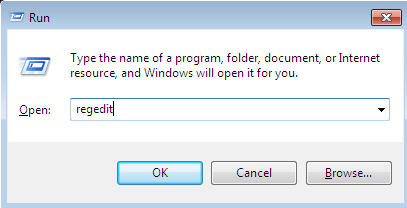
  1. Press the “Windows + R”, then open the “Run” dialog box and type “regedit
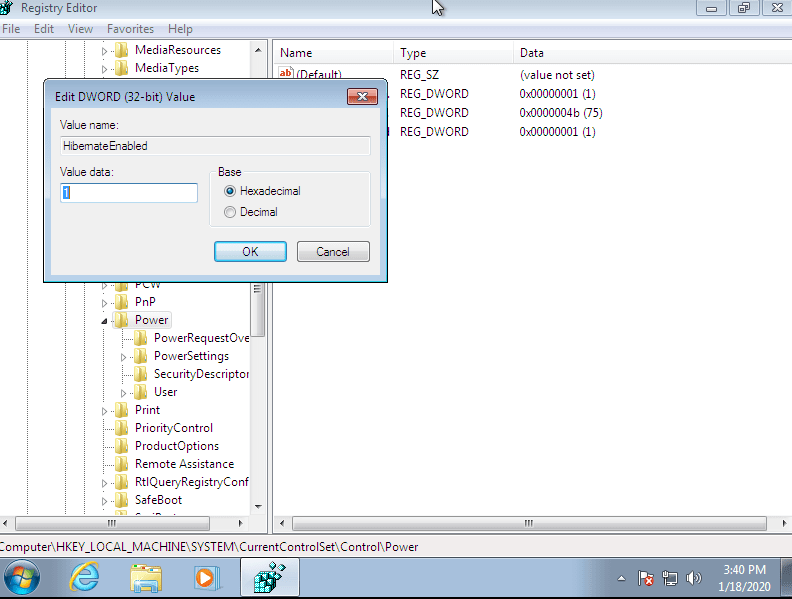
  • In registry window, navigate to the “HKEY_LOCAL_MACHINE\SYSTEM\CurrentControlSet\Control\Power
  • In the right pane of the power key, double click on the “HibernateEnabled”.
  • To enable hibernate type “1” in the data value box and to disable type “0” in the data value box and click “OK

After, hibernate mode on, it appears besides the “Shut down” button.

After enable the hibernate mode, open some applications and hibernate the machine, then turn back on.

Verify hiberfil.sys has been created

After hibernate the machine, the system creates hiberfil.sys file in the root C drive. By default, hiberfil.sys file is not visible in file explorer, because of that we should have to change the settings.

  1. Open the Control Panel and go to the Appearance and Personalization, then Folder Options.
  2. Switch to the View option and enable the “Show hidden files, folders and drives” under “Hidden files and folders”.
  3. Untick the option “Hide protected operating system files”, then it appears system files if File Explorer which were hidden.
  • Then hiberfil.sys file appear in the root C drive

Extract hiberfil.sys file

  • Tool used to extract the file: AccessData FTK imager version 3.1.2.0
  • Open the AccessData FTK imager and go to the option “File
  • Select “Add All Attached Devices
  • Then the all attached devices add to the list on the top of the left corner.
  • Go to the “C/ NONAME [NTFS] / root”, then it is displayed hiberfil.sys file.

Right click on the “hiberfil.sys” and select “Export Files…”

  • Extraction of hibersfil.sys file is completed.

Analyse hiberfil.sys file

  • Used OS for analyse: Ubuntu 16.04
  • Tool: Volatility

Volatility is open source software programs use for analysing RAM in 32-bit and 64-bit systems. It supports for Linux, Windows, Mac and Android systems. Volatility is based on the Python. It can be run on Windows, Linux and Mac systems. Volatility can analyse raw dumps, crash dumps, VMware dumps and may others.

  1. Before analysis, clarify Windows 7 OS details. To do that, go to right click on the “My Computer” and select “Properties
  • Copy hiberfil.sys to the ubuntu machine.
  • Converting hiberfil.sys file into a raw file.

Hiberfil.sys is a compressed memory file. Before analyse, we should have to decompress into a raw memory dump. Actually, using volatility, we can work with hiberfil.sys. but process is very slow because it will have to decompress every time a different plugin is used. Therefore, we get raw image of the hiberfil.sys using “imagecopy” plugin and it will speed up the process.

  • Verify creation of “hiberfil.raw
  • Using “pslist” plugin, we can look running processes when the system goes into hibernation mode.

References:

Heartbleed (CVE-2014-0160) vulnerability

What is Heartbleed vulnerability?

Heartbleed is a vulnerability in OpenSSL cryptography library (written in C) was discovered in 2014. OpenSSL provides Secure Socket Layer (SSL) and Transport Layer Security (TLS) implementation to encrypt the traffic going on the internet. Heartbleed vulnerability is a bug of OpenSSL library’s code that handles the heartbeat extension (RFC 6520) for TLS/DTLS, not a bug either of SSL or TLS protocols. TLS protocol is used to secure reliable protocols like TCP, SMTP, POP3, VoIP, VPN and DTLS (Datagram Transport Layer Protocol) is used to secure unreliable protocol like UDP, DCCP. Using this vulnerability, an attacker can exploit this bug to read memories of vulnerable systems without leaving any evidence of the particular compromised system.

What is heartbeat protocol?

heartbeat protocol is a protocol that running on top of the Record Layer which consists of two message types:

  • HeartbeatRequest
  • HeartbeatResponse

HeartbeatRequest can arrive any time in the lifetime of the connection from one peer to another peer and whenever the HeartbeatRequest is received, it should be answered with the HeartbeatResponse. If HeartbeatRequest is not got the corresponding HeartbeatResponse in pre-defined time period, it is eligible for resending the HeartbeatRequest up to pre-defined count of time until it receives corresponding HeartbeatResponse. Even after that count of time, if it not received particular HeartbeatResponse yet, the TLS/DTLS connection may be terminated by the application that initiated the HeartbeatRequest messages.

What is Heartbeat Extension?

The support of Heartbeats is indicated with Heartbeat Hello Extensions. A peer cannot only indicate that its implementation supports Heartbeats. It can choose whether it allows to receive HeartbeatRequest and respond with HeartbeatResponse messages or only allows to send HeartbeatRequest messages. This decision can be changed in every renegotiation. If the HeartbeatMode is peer_allowed_to_send, it allows to receive HeartbeatRequest and HeartbeatResponse messages. When the HeartbeatMode is peer_not_allowed_to_send, HeartbeatRequest message must not be sent to a corresponding endpoint. If an endpoint receives a HeartbeatRequest message that has indicated peer_not_allowed_to_send, the endpoint should drop the message and may send an unexpected message alert.

Figure1- Sample format of the Heartbeat Hello Extension

How does Heartbleed bug works?

Heartbleed bug got start from its improper input validation in the OpenSSL implementation of the TLS Heartbeat extension. because of its missing the bounds check on the length (length of the payload) and payload fields in Heartbeat requests, coupled with the trusting data received from other machines (an endpoint or other peer), the responding machine mistakenly sends back its own memory data.

            Figure 2- Sample of Heartbeat protocol messages

According to the RFC 6520, two peers sending Heartbeat messages each other during TLS encrypted handshake. When Heartbeat response, it might have to contain extract copy of the payload which was in the HeartbeatRequest message. When a HeartbeatRequest message receives, the contents of the message are copied to the memory and copies the contents back in response. OpenSSL is allocated memory for the response that is based on the length and then it copies payload in the response using memcpy ().

            Figure 3- command use for copy data

According to the Figure 3, bp is the place it’s coping it to, p1 is where it’s being copied from, and payload is the length of data being copied from.  The problem is there is no way to check if the amount of data in p1 is equal to the value given of payload.

Since its does not validate the length field, attacker can send greater value than the actual length of the payload. The responding machine to Heartbeat requests, do not verify payload length is same as specified in length field. Thus, the machine copies extra data residing in memory after the payload into the response. Therefore, extra bytes are additional data in the remote process’s memory. That is how Heartbleed vulnerability works.

            Figure 4- Example for how Heartbleed works


According to above example, in Normal usage, client sends 4 letter word “bird” as the payload in Heartbeat request and server copy that into the memory. When in responding, it copies back in to the payload and send. Because of it does not check the length field and payload, attacker asks for 500 characters even though it sends the word “bird”. Except word “bird”, it copies data in the memory up to 500 characters to the payload when HeartbeatResponse sends. In those data, it can be included sensitive data.

What is the impact of the Heartbleed vulnerability?

Heartbeat bug allows anyone in the internet to read the memory of the systems protected by the vulnerable versions of OpenSSL software. Sensitive information such as identifiers, tokens, usernames, passwords, server’s private cryptography keys can be extracted from the memory. This attack leaves no apparent of evidence in the log files. Therefore, it is difficult to identify whether machine has been compromised or not.

An attacker can be read 64 kilobytes of server memory for a single Heartbeat message. But there is no limit to amount of memory that can be read.

How can Heartbleed be avoided?

By validating message length and ignoring Heartbeat messages asking for more data than the payload needs.

            Figure 5-Sample code that OpenSSL used to come over from Heartbleed bug

References:

Design a site like this with WordPress.com
Get started